Sidebar tonen 
Statistieken
- 84325 Aantal leden
- 2410 Meeste online
-
Nieuwste lid smilie Registratie datum

Forumstatistieken
- Aantal topics 70.2k
- Aantal berichten 683.1k
Top 5 Topics (Meest gereageerd in 90 dagen)
-
We willen met Higherlevel graag een plek zijn, en blijven, waar we ondernemers helpen. Daarom organiseren we een digitale brainstorm over de toekomst van ons ondernemersforum. Wat werkt goed? Wat mis je? En hoe kunnen we ervoor zorgen dat het forum nóg waardevoller, inspirerender en makkelijker te gebruiken wordt? Of je nu nieuw bent op het forum of al jaren meedoet: alle ervaringen en ideeën zijn welkom. We zoeken ondernemers die kritisch mee willen denken, ideeën willen delen en samen willen
-
Hallo allemaal, Ben benieuwd of iemand mij kan helpen of informeren over onderstaand probleem. We hebben een online webshop en hebben dit 5 jaar. Elk jaar daalt onze aantal conversies met zo'n 25% De kosten van inkoop, marketing, personeel zijn afgelopen jaren flink gestegen. Helaas komen wij er niet achter waarom er steeds minder klanten bestellen. We hebben een geheel nieuwe website opgezet die veel gebruiksvriendelijker is, met name menu's, filters, bestellen etc. Dit heeft geen effect gehad
-
Dit verzameltopic is bestemd voor de topics van Vraagstellers die: Denken met AI in razend tempo het "Ei van Columbus" te hebben ontwikkeld voor een probleem wat mogelijk allang door veel bestaande toepassingen is/wordt opgelost, of... waarvan (nog) niet duidelijk is of het probleem wel echt bestaat? Moderators verplaatsen topics die naar het bovenstaande 'rieken' hierheen en zullen het met speciale aandacht toetsen aan de Forumregels en indien, waar en voor zover noodzakelijk aanpassen aan d
-
Higherlevel heeft een nieuwe look! We zijn altijd bezig het forum te verbeteren en ondernemers zo goed mogelijk te helpen. Daarom zijn we met de hulp van gebruikers bezig geweest met een nieuwe UX voor het forum, met in het bijzonder de homepage. Zodat je nog sneller vind wat je zoekt! Het uitgangspunt van dit redesign: content-first, en pagina's organiseren op basis van de intent van gebruikers. Dat betekent concreet: Jouw eigen homepage: ben je ingelogd, dan zie je meteen wat voor jou als
-
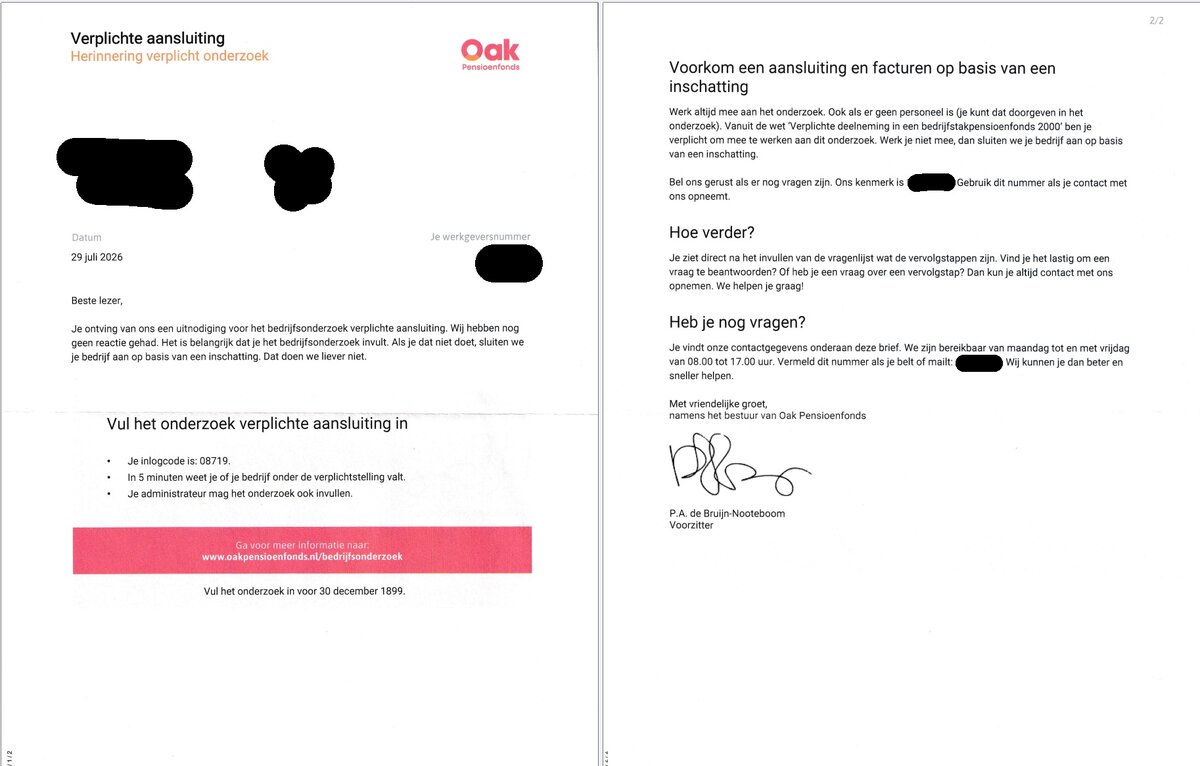
Ik heb een brief gekregen van Oak pernsioenfonds. Maar de brief is wat raar opgesteld. Ik moet de het onderzoek invullen voor 30-12-1899. Dus ik ben al een paar jaartjes te laat. We hebben nooit eerder een brief ontvangen en hij heeft een bijzondere schrijfstyle. Ik durf de link niet zomaar in te te typen. Het andere rare aan de brief is het ontbreken van een telefoonnummer of email. Als ik het bedrijf bel kom ik er door de drukte daar niet door heen. Wat denken jullie is dit een scam of